🎫 Stamp system: edit/add rewards in my loyalty program
Change/Add Rewards in my Loyalty Program
Example 1: You have seasonal products and it's time for you to change your program rewards at the end of the season
Example 2: A customer has submitted a reward idea and you want to add it.
Follow this step-by-step guide to easily manage your program rewards.
Step 1: Login to your account on the Yollty website.
This step is very simple, just go to the Yollty site https://yollty.com/, and click on Log In, in the upper right corner.
➡️ Step 2: Access your dashboard.
Once logged in, you will be redirected to your dashboard. Then simply click on Configurations and then Rewards
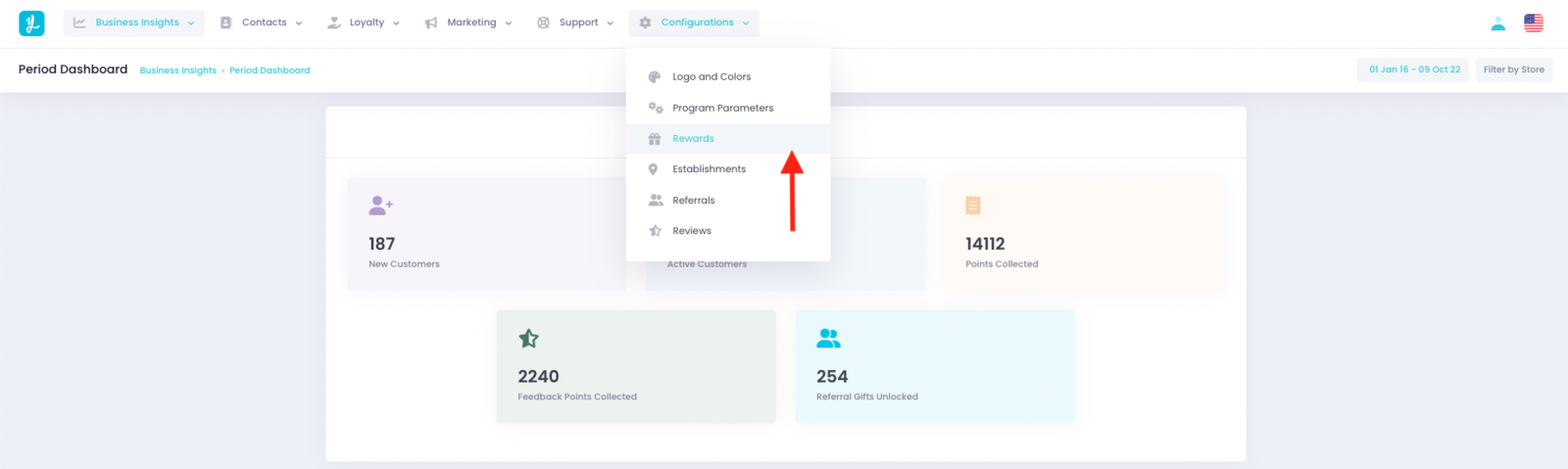
➡️ Step 3: Modify as you like
From this page, you will be able to:
* Change the reward(s) set up
To do this, simply write the name of your new reward.
-
Add a secondary gift
For example, a gift with 3 stamps then a gift with 6 stamps. -
Change the number of stamps on your card
For example, I have a 6-stamp card and I want to increase it to 10 stamps.
Finally, don't forget to press the
Savebutton at the bottom right to save all your changes.
And VOILA! You know how to add or change your rewards 😁
Related Articles
🎁 Points System: Edit/Add rewards in my loyalty program
Change/Add Rewards in my Loyalty Program Example 1: You have seasonal products and it's time for you to change your program rewards at the end of the season Example 2: A customer has submitted a reward idea and you want to add it. Follow this ...🎟 Configure stamp collection parameters
Choose how many stamps your customers will receive per euro spent Example: You want to change your initial choice on how your customers will claim their points Follow this step-by-step guide to manage your program rewards very easily. Step 1: Login ...📱 Add/Manage terminals
Manage or add a terminal from your dashboard Example 1: You need to give control to your team/employees to distribute points/stamps. Example 2: An employee, a member of your team has left and you need to remove their Yollty access. Follow this ...🏘 Manage/Add an establishment
Manage or add a facility from your dashboard Example 1: Your facility is doing so well that you open a second one. 🎉🎉🎉 Example 2: You need to change information for existing locations, such as hours of operation. Follow this step-by-step guide to ...🙅♂️ How to remove a member from your loyalty program
This feature is not yet available but we are working on it and hope to release it soon. In the meantime, contact us directly by email or via our messaging system. If you have any questions you can contact us via our live messaging or by email at ...